
How to Visualize a Room Layout: A Comprehensive Guide for Business Owners
How to Visualize a Room Layout: A Comprehensive Guide for Business Owners
Every business owner knows the sinking feeling of "sunk costs." In the world of interior design and office planning, few things are as frustrating—or expensive—as ordering furniture that looked perfect in the catalog but ends up dominating the room, blocking traffic flow, or simply clashing with the existing architecture. Whether you are setting up a new boutique retail space, redesigning an open-plan office, or staging a property for sale, the ability to accurately foresee the end result is a critical business skill.
Learning how to visualize a room layout before you spend a single dollar on procurement is the ultimate risk management strategy for your physical assets. It bridges the gap between a conceptual idea and a functional reality. Without proper visualization, you are essentially gambling with your budget, hoping that scale, proportion, and workflow will magically align.
This guide is designed for professionals who need actionable, precise methods to plan spaces. We will move beyond simple guesswork, exploring both low-tech, tactile methods and high-tech AI solutions. You will learn how to account for "invisible" elements like clearance zones and lighting, ensuring that your final space is not just aesthetically pleasing, but operationally efficient. By the end of this article, you will have a master-level understanding of spatial planning, allowing you to execute design changes with absolute confidence.
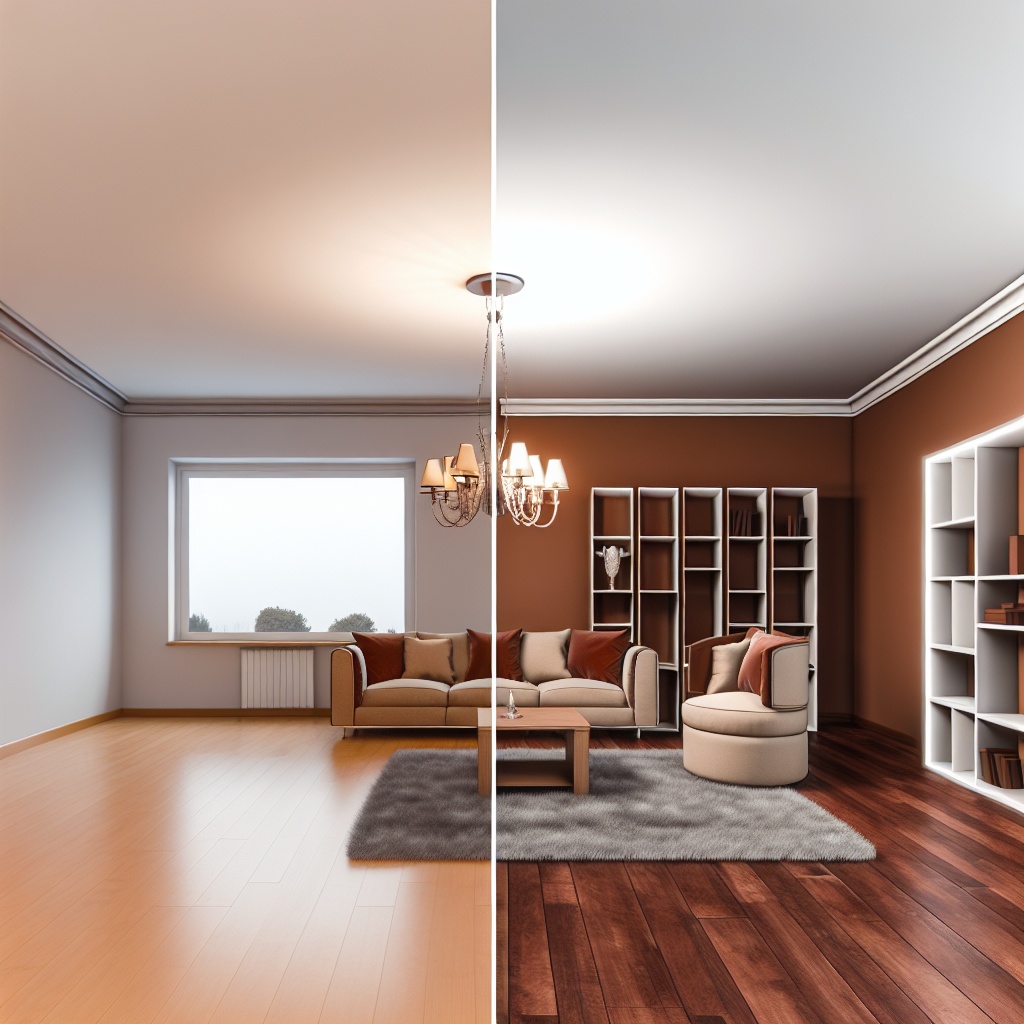
1. The Cost of "Guesswork" in Interior Design
Before diving into the "how," it is vital to understand the "why." For a business owner, time and capital are finite resources. Skipping the visualization phase is often justified as a time-saver, but the downstream consequences usually prove otherwise.
Understanding Scale and Proportion
The most common error in layout planning is a misunderstanding of scale. A conference table that looks sleek in a 5,000-square-foot showroom will feel like a behemoth in a 12x14 foot meeting room. Our eyes are easily deceived by ceiling heights and lighting in showrooms. Visualization forces you to confront the mathematical reality of the object relative to the container (the room). It ensures that the proportion of empty space (negative space) to filled space is balanced, which is essential for a professional atmosphere.
The Financial and Psychological ROI
Consider the logistics of a mistake. If you order ten workstations that don't fit the grid:
- Direct Costs: Restocking fees (often 15-25%), return shipping costs.
- Indirect Costs: downtime for your team, storage fees for the incorrect furniture, and the administrative time spent correcting the order.
- Psychological Impact: A poorly planned space creates "visual noise." Cluttered layouts increase cognitive load, reducing employee productivity and making clients feel cramped or anxious.
Seeing the result first—whether through tape on the floor or a 3D render—provides psychological certainty. It allows stakeholders to sign off on a vision, reducing decision fatigue and aligning the team on the final outcome.
2. Prerequisites: Gathering Your Data
You cannot visualize what you haven't measured. The foundation of any successful layout is accurate data. Before you start moving virtual or physical furniture, you need to map the terrain.
Essential Tools
To begin, you will need a specific set of tools. While a standard tape measure is a household staple, professional layout planning requires more precision.
- Laser Measure (Lidar): This is non-negotiable for business owners. It allows you to measure long distances (like warehouse lengths) instantly and accurately without needing a second person to hold the other end of the tape.
- Steel Tape Measure (25ft): For measuring smaller details like window sills, radiator depth, and door trim.
- Graph Paper (1/4 inch scale) or Tablet: For sketching the rough "as-built" plan.
- Masking Tape / Painter's Tape: For physical visualization steps.
- Camera/Smartphone: To document the space from all corners.
Step-by-Step Measuring Guide
- The Perimeter: Measure the length of every wall. Measure from corner to corner. If you have baseboards, ensure you are measuring the actual wall-to-wall distance, or note that the measurement includes baseboards (which reduces usable floor space).
- Fixed Elements: Locate and measure all "immovable" objects. This includes radiators, structural columns, fireplaces, and built-in cabinetry. Note their distance from the nearest corner.
- Apertures (Doors and Windows): This is where most people fail.
- Measure the width and height of the window.
- Measure the distance from the floor to the bottom of the window (sill height).
- Measure the distance from the top of the window to the ceiling.
- For doors, measure the width of the door and the swing radius. A door that cannot open fully because of a desk is a major fire hazard and annoyance.
- The "Third Dimension": Measure the ceiling height. If the ceiling is vaulted or has exposed ductwork, note the lowest point of clearance. This dictates how tall your shelving or lighting fixtures can be.
- Utilities: Mark the exact location of electrical outlets, data ports, and HVAC vents. You do not want to visualize a reception desk in the center of the room only to realize there is no way to plug in the computer.
Pro Tip: Always measure in a clockwise direction around the room. This ensures you don't miss a wall section and makes it easier to transfer your numbers to a drawing later.
3. The "Tape on the Floor" Method: Analog Visualization
While digital tools are powerful, there is no substitute for physically standing in the space. The "Tape on the Floor" method is a classic interior design trick that helps you understand traffic flow and volume.
Why This Step Matters
A computer screen is 2D. It cannot tell you how it feels to squeeze past a conference table. Physical visualization helps you identify "pinch points"—areas where traffic flow is constricted. It connects your proprioception (body awareness) with the layout.
Step-by-Step Execution
- Clear the Room: Ideally, the room should be empty. If not, push existing furniture to the center or edges.
- Map the Footprint: Using painter's tape (which won't damage flooring), outline the exact dimensions of the furniture you intend to buy. If you are looking at a desk that is 60" x 30", tape a 60" x 30" rectangle on the floor.
- Account for Chair Push-Back: Don't just tape the desk. Tape the space required for a chair to push back. This is usually an additional 24-30 inches behind the desk.
- The "Walk-Through" Test: Walk through the room. Walk the path a client would take. Walk the path an employee would take to the breakroom. Do you have to turn sideways to get past the taped area? If so, the layout fails.
Using Cardboard for Volume
Tape shows you the floor space, but it doesn't show you volume. A low-profile sofa takes up the same floor space as a high-back executive booth, but they feel completely different in the room.
- The Box Method: Save large delivery boxes. Build a rough 3D shape of the furniture using these boxes.
- The Sightline Check: Stand in the doorway. Does the box pile block the view of the window? Does it make the room feel claustrophobic? This helps you visualize vertical intrusion.
4. Digital Visualization: Leveraging AI and Software
Once you have physically sensed the space, it is time to refine the vision using technology. Modern tools allow you to "try on" different layouts without lifting a finger. This is where you test specific products, colors, and configurations.
The Shift from Manual to AI
Historically, 3D modeling required expensive CAD software and a steep learning curve. Today, AI-driven interior design tools have democratized this process. You can now upload a photo of your room, and AI can recognize the floor and walls, allowing you to drag and drop furniture into the scene.
How to Execute Digital Visualization
- Choose Your Platform: Select a user-friendly tool like SketchUp (for detailed modeling), Planner 5D, or specific AI visualizers like Interior AI.
- Create the Shell: Input the measurements you took in Section 2. Be precise. If your wall is 12' 4", do not round down to 12'.
- Add Fixed Elements: Place your windows, doors, and columns exactly where they are in real life.
- Furnish: Start dragging in furniture assets. Most software has libraries of generic furniture that match standard dimensions.
- Render: Use the "render" or "3D view" function to walk through the space virtually.
Why AI is Faster
AI tools can automatically suggest layouts based on the room's shape. For example, if you upload a floor plan of a small office, an AI tool can generate three different desk configurations (perimeter, cluster, or rows) in seconds. This allows you to rapid-prototype ideas that you might not have considered.
Verification: When looking at the 3D model, change the camera height to "eye level" (approx. 5'6"). Often, bird's-eye views (looking from the ceiling down) make a room look spacious, but the eye-level view reveals it is overcrowded.
💡 Additional resource: Search YouTube for "ai interior design tools tutorial" for more tutorials.
5. Styling and Mood: Testing Aesthetics
Visualizing a layout isn't just about where the furniture goes; it's about how the room feels. A layout that works functionally can still fail if the style clashes with the architecture or the business brand.
Testing "Safe" vs. "Bold" Styles
Digital visualization allows for risk-free experimentation.
- The Safe Route: Try a Contemporary or Mid-Century Modern layout. These styles rely on clean lines and raised legs on furniture, which allows light to pass under pieces, making the room feel larger.
- The Bold Route: Have fun with niche styles. What would your office look like in Industrial Steampunk or a playful Zombie Apocalypse bunker style (rugged, utilitarian)? Even if you don't choose these, pushing the boundaries in a simulation can spark creative ideas for unique focal points or color schemes.
The Impact of Lighting on Layout
Lighting changes the visual "weight" of a room.
- Natural Light: In your visualization, note where the sunlight hits. Never place a computer screen directly opposite a window (glare) or with the window directly behind the user (silhouette on video calls).
- Artificial Light: Visualize your light fixtures. A low-hanging pendant light over a conference table anchors the space, defining the "zone" without needing walls.
- Shadows: 3D rendering tools can simulate shadows. This helps you see if a tall bookshelf will cast a dark shadow over a workspace, necessitating extra task lighting.
6. Ergonomics and Flow: The Invisible Layout
The most critical part of how to visualize a room layout is seeing the negative space—the empty air between the furniture. This is where people live and move.
Checking Clearance Zones
In a business setting, clearance isn't just about comfort; it's often about compliance (ADA in the US, for example).
- Major Walkways: Should be at least 36-48 inches wide. This allows two people to pass each other without turning sideways.
- Desk Clearance: Allow 48-60 inches between the back of one desk and the back of another if people are sitting back-to-back.
- Door Swings: Ensure the "arc" of any door is completely clear of furniture.
Conversation Circles vs. Work Zones
Visualize how people will interact.
- Conversation Circles: In a lobby or breakroom, furniture should be grouped so that people are within 8 feet of each other. Further than that, and conversation becomes strained.
- Sightlines: Sit in the virtual chair. What do you see? In an office, you want to minimize visual distractions. In a retail store, you want clear sightlines to high-margin products.
7. Common Mistakes to Avoid
Even with the best tools, certain pitfalls can derail your visualization. Being aware of these common errors will save you from a layout disaster.
1. The "Flat Plan" Trap (Ignoring Verticality)
The Mistake: Relying solely on a 2D floor plan.
Why it happens: It is easier to draw a box on a flat paper than to imagine a 3D object.
The Consequence: You might place a tall cabinet next to a window, not realizing it blocks 50% of the natural light. Or, you might buy low-back chairs for a room with 12-foot ceilings, making the furniture look like dollhouse miniatures.
The Fix: Always use elevation drawings or 3D renders to check the vertical relationships.
2. Overcrowding the Virtual Room
The Mistake: Trying to maximize seat count or storage by filling every inch.
Why it happens: The desire for "efficiency."
The Consequence: A room that feels suffocating. In retail, the "butt-brush effect" (shoppers being brushed from behind) causes customers to leave displays immediately. In offices, it increases stress.
The Fix: Respect the negative space. If in doubt, remove one piece of furniture.
3. Forgetting Infrastructure
The Mistake: Designing a layout that ignores power outlets, thermostats, and vents.
Why it happens: These elements are small and often missed during the measuring phase.
The Consequence: You have a beautiful layout, but extension cords are snaked across the floor (trip hazard) because the nearest outlet is on the opposite wall. Or, a bookshelf blocks the return air vent, causing HVAC issues.
The Fix: Mark all utilities on your initial plan in red ink.
8. Troubleshooting Your Layout
Sometimes, you visualize the room, and it just doesn't work. The furniture doesn't fit, or the flow feels wrong. Here is how to troubleshoot.
Problem: The Room is Too Small
- Solution: Go vertical. Visualize tall, narrow shelving units instead of wide credenzas. Use glass or acrylic furniture (ghost chairs) in your visualization; their transparency tricks the eye into seeing more space.
Problem: The Room is Long and Narrow (Bowling Alley Effect)
- Solution: Break the visual "tunnel." Use your visualization tools to place a rug or a furniture grouping perpendicular to the long walls. Create distinct "zones" (e.g., a waiting zone and a reception zone) using low dividers or plants to stop the eye from traveling the full length of the room instantly.
Problem: Structural Columns are in the Way
- Solution: Instead of fighting the column, integrate it. Visualize wrapping the column with a circular desk or using it as the anchor point for a storage unit. In your 3D model, test treating the column as a feature (painting it a bold color) rather than an obstacle.
9. Tips and Best Practices
To wrap up your visualization masterclass, here are three pro tips that professional designers use to ensure success.
Tip 1: The "Squint Test"
When looking at your 3D render or your physical room, squint your eyes until the image becomes blurry. This reduces the detail and leaves you with just the masses and colors.
- Why it works: It helps you see the balance of the room. Is one side "heavier" (darker/more crowded) than the other? A well-laid-out room should feel balanced even when blurry.
Tip 2: Visualize the "Desire Paths"
A desire path is the route people actually take, not the one you want them to take.
- Implementation: Look at your layout. If you have placed a sofa that forces people to walk in a wide arc to get to the door, realize that they won't do it. They will squeeze past the edge of the sofa or jump over the corner.
- The Fix: Design your walkways to follow the most direct line between points of interest (e.g., door to desk).
Tip 3: Use Augmented Reality (AR) for Final Verification
Many furniture retailers (like IKEA, Amazon, and Wayfair) offer AR apps.
- Implementation: Before buying that specific chair, use the app to project it into your actual room through your phone camera.
- Benefit: This checks color accuracy and scale in your specific lighting conditions, which a generic 3D model cannot do perfectly.
Conclusion
Mastering how to visualize a room layout is more than just a design exercise; it is a strategic business process. By moving through the stages of precise data gathering, tactile "tape on floor" testing, and sophisticated 3D modeling, you eliminate the expensive risks associated with furnishing a space. You move from "hoping it fits" to "knowing it works."
Remember, the goal of visualization is not just to fit furniture into a room, but to create an environment that facilitates the purpose of your business. Whether that is productivity, sales, or comfort, the layout is the invisible skeleton that supports those goals. Start with your measurements today, grab some painter's tape, and begin the process of seeing your future space before you build it.
Key Takeaway: Never rely on the eye alone. The combination of laser-precise measurements, physical footprinting with tape, and 3D digital verification provides a fail-safe system for interior planning. By investing time in visualization upfront, you save capital, prevent logistical nightmares, and create spaces that truly serve your business needs.
Frequently Asked Questions
What are the best free tools for visualizing a room layout?
There are several excellent free tools available for beginners. Floorplanner and Sweet Home 3D are popular desktop options that allow you to build 2D and 3D models easily. If you prefer using a smartphone, Magicplan lets you scan a room with your camera to create a floor plan, and many furniture retailers (like IKEA or Amazon) offer Augmented Reality (AR) apps that let you virtually place furniture in your actual space to see how it fits.
How can I visualize furniture placement without using software?
The most effective low-tech method is using painter’s tape (masking tape). Measure the dimensions of the furniture you are considering and tape the outline directly onto your floor. This helps you physically feel the flow of the room and see exactly how much floor space the item will take up. Alternatively, you can draw your room to scale on graph paper and create moveable paper cutouts of your furniture.
How much walking space should I leave between furniture pieces?
To ensure a comfortable traffic flow, aim for 30 to 36 inches (76-91 cm) of clearance for major walkways. For tighter areas, such as the space between a sofa and a coffee table, you should leave about 14 to 18 inches (35-45 cm) so items are within reach but you still have room to sit down comfortably.
Why does my room look crowded even though the furniture fits on paper?
This usually happens because of vertical scale and visual weight. A floor plan only shows the "footprint" of an item, not its height or bulk. A tall, dark, solid wood cabinet will make a room feel much smaller than a glass or open-shelving unit of the exact same dimensions. When visualizing a layout, consider the height of the ceilings and try to balance "heavy" items with "light" items to keep the room feeling open.
Tags
Related Articles

Customer Stories: How Interior Design Software Transforms Business Outcomes
This article delves deep into customer stories interior design software has created. Get expert insights and actionable tips.

Commercial Interior Design Software vs. Residential Tools: A Strategic Guide for Business Owners
Conversely, investing in high-end commercial interior design software for smaller, boutique residential projects can result in unnecessary overhead.

How to Sell Empty Homes Faster: The Ultimate Guide to AI Staging
In this comprehensive guide, we will explore exactly how to sell empty homes faster using the latest AI technology. Get expert insights and actionable tips.